What are secure FTP and Telnet?
Secure File Transfer Protocol (SFTP (external site, opens in new tab)) is a secure method for transferring files from one computer to another through networks such as the Internet. This replaces the traditional File Transfer Protocol (FTP), where data are transmitted in clear text and hence could be intercepted. With SFTP, login passwords and data are encrypted during data transfer.
Secure Shell (SSH (external site, opens in new tab)) is a network protocol that provides a secure method for remote access. SSH was designed as a replacement for telnet and other insecure remote shells. Encryption is enforced to ensure a secure connection.
Secure FTP and Telnet Services at EdUHK
SFTP and SSH services are available in the following central network servers at EdUHK.
| Server Hostname | Description | Support SFTP | Support SSH |
|---|---|---|---|
| sun.eduhk.hk | Unix server for - Internet webpages - Intranet webpages - Staff personal webpages | Yes | Yes |
| moon.eduhk.hk | Unix server for students' personal webpages | Yes | Yes |
| msftp.eduhk.hk | Microsoft-based network drives (N & S Drive) for file storage | Yes | - |
Step by step
Recommended Software Tools
OCIO recommends the following software for accessing our servers.
1. Secure FTP (SFTP)
For Windows (Network PC at EdUHK):
WinSCP (external site, opens in new tab) is an open-source SFTP client for secure transfer of files between local and remote computers. Users can access WinSCP via "Network Teaching Software" on network PCs at EdUHK .
For Windows (Non-EdUHK PC):
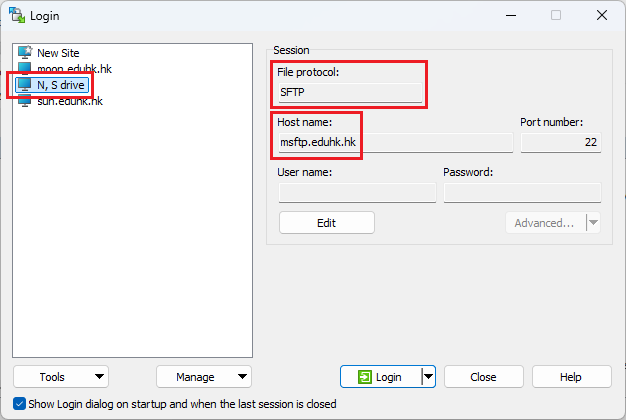
For non-EdUHK network PCs/notebooks, users can download WinSCP from http://winscp.net (external site, opens in new tab). To set up WinSCP to access network servers, you need to configure it with the corresponding hostname (e.g. msftp.eduhk.hk, sun.eduhk.hk or moon.eduhk.hk) and protocol (i.e. SFTP).
How to use it?
- Open WinSCP.
- Choose a server from the preset list (e.g. N, S Drive) and click "Login".
- Enter your username and password.
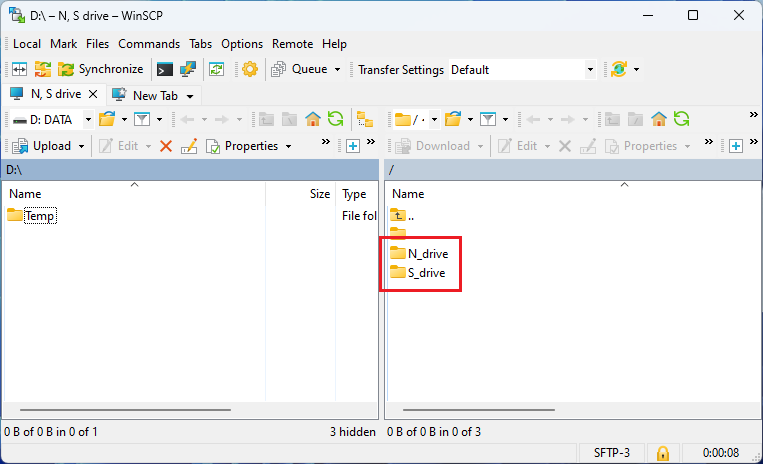
- You can transfer files between your PC and the server by dragging and dropping.
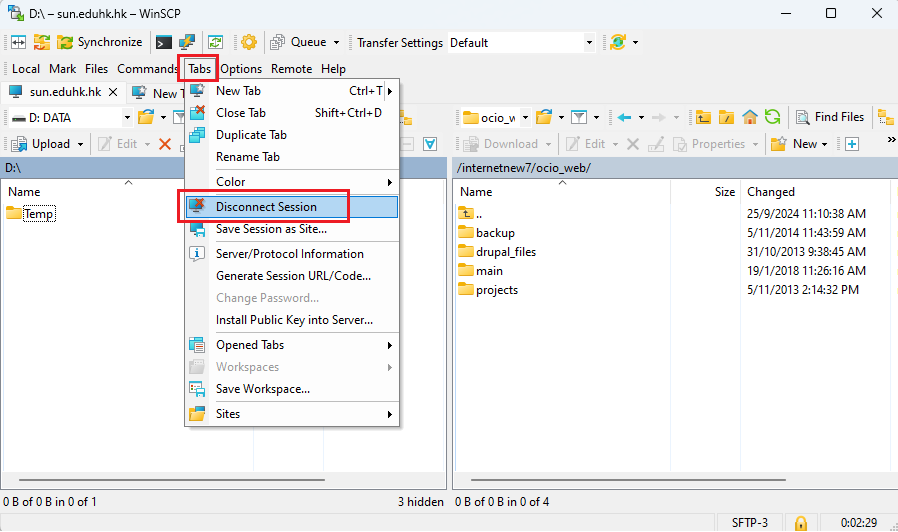
- To disconnect the current session, click "Tabs" and "Disconnect Session" from the toolbar.
For Mac:
For Mac users, please use Cyberduck (external site, opens in new tab) or any other SFTP client software you prefer.
Secure Shell (SSH)
For Windows and Mac:
PuTTY (external site, opens in new tab) is a free and open-source terminal emulator application which can act as SSH client software.
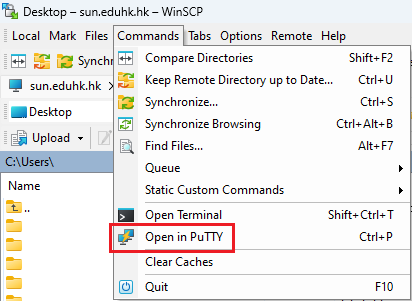
If you have installed WinSCP on your computer, you could launch PuTTY via WinSCP. Click "Commands" in the menu bar and then "Open in PuTTY" without installing it separately.