

Getting Help
- Presentation of "Introduction to IT Services"
- Briefing videos of Online Course Registration:
English (EdUHK website, opens in new tab) / Cantonese (EdUHK website, opens in new tab) - FAQ
- IT Help Desk
Hotline: 2948 6601
Address: Room C-LP-20, Tai Po Campus
Email: helpdesk@ocio.eduhk.hk - Classroom Service Hotlines
2948 6529 (Tai Po Campus)
2190 8581 (Tseung Kwan O Study Centre)
2190 8660 (North Point Study Centre)
2190 8650 (West Kowloon Study Centre (Austin Road/Museum Drive))
🔐 Computer Accounts
You are entitled to two computer accounts, namely the EdUHK network account and the Google account, with the same login name (that is, sXXXXXXX@s.eduhk.hk where XXXXXXX is first 7 digits of your student number*) and password.
*Example:
| Student number | 12345678 |
|---|---|
| Login name for both the EdUHK network account and the Google account | s + 1234567 + @s.eduhk.hk = s1234567@s.eduhk.hk |
| With your EdUHK network account, you can access: | With your Google account, you can access: |
|---|---|
|
|
| |
|
** Please note that the service provider has the right to amend the terms of service.
🔑 Account Passwords
Your initial account password to both the EdUHK network account and the Google account is the first 6 digits of your EdUHK student number plus the last 4 digits of the HKID number (including the check digit) or the last 4 digits of the Chinese Mainland ID (中國內地身分証號碼) for Chinese Mainland students/ passport number for overseas students.
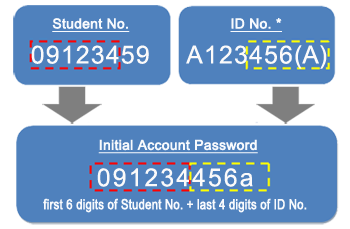
* ID No. refers to HKID or Chinese Mainland ID or Passport No.
** Students who have both an HKID and a Chinese Mainland ID, the system will use the HKID number to set the initial password.
For security reasons, users are recommended to change their initial passwords when they get their accounts and thereafter change them regularly. It is the University’s policy that users change their account passwords every year. To change your passwords, please go to The Portal (EdUHK system, opens in new tab). For more details, please refer to the Password Policy (PDF file).
📧 Email Services for Students
To access your mailbox or other Google Workspace for Education services, please go to Webmail (EdUHK system, opens in new tab) and click Google. Alternatively, you can log in to Gmail (external site, opens in new tab) directly.
 (external site, opens in new tab)
The student’s email is Gmail-based.
Please also see Email Services for Students and Google Workspace for Education - Student FAQ for more related information about the student email services.
* If you are in the Chinese Mainland, please access Gmail via the VPN add-on service. For details, please visit SSL VPN.
🔒 Multi-Factor Authentication (MFA)
Multi-Factor Authentication (MFA) is widely adopted to strengthen security by requiring the user to provide what he knows (e.g., a password) and what he has (e.g., a registered mobile phone). At EdUHK, MFA is enabled for M365 and designated systems through the MFA app - Microsoft Authenticator. You will be asked to approve your sign-in through the app whenever you access these services.
While it is not mandatory, you are strongly advised to enable Google 2-Step Verification, which adds an extra level of security to protect your Google accounts. Please see FAQ: How can I enable 2-Step Verification to better protect my account? for more details.
📱 MyEdUHK Mobile App
The MyEdUHK mobile app offers quick access to essential campus systems and resources, including:
- Smart Dining: On-campus dining guide, with real-time canteen menus and queuing status
- Integrated Transportation: Estimated time of arrival/departure for public transportation and shuttle buses, and shuttle bus queuing status during peak hours
- Campus Navigation & Facilities: Enhanced step-by-step navigation using mobile location services and Library Seat Finder to locate available study spaces
- Academic & Support Links: Moodle, MyLibrary, Print Quota, notification feature and Portal announcements, and more
Download the app from Google Play (external site, opens in new tab), App Store (external site, opens in new tab), or HUAWEI AppGallery (external site, opens in new tab), and visit MyEdUHK - Mobile App for All for more information.

🆔 EdU Card for Students
Your EdU Card serves as your student ID and grants access to the University's facilities such as the Library, sports facilities, swimming pools, hostels, etc. The Registry (REG) handles card issuance and replacement, while OCIO manages card printing. Learn more at EdU Card (EdUHK website, opens in new tab).
🌐 Connecting to the Campus Network
- On Campus: Wi-Fi is available across Tai Po Campus and Study Centres. For optimal performance, connect to SSID EdUHK / Hostel / Quarters (5GHz). Please visit EdUHK wireless network for more details.
- At Home: Use the University's Secure Sockets Layer Virtual Private Network SSL VPN to securely access restricted campus resources remotely.
🛡 VPN
Students can make secure connections from their home computers or mobile devices to the campus network over the Internet using the Secure Sockets Layer Virtual Private Network (SSL VPN). They can also access certain restricted IT services such as SPSS, and make connections to some central network servers using SFTP outside the campus.
To access the service, please install the SonicWall SSL VPN client on your devices and log in with your email address. While in the Chinese Mainland, please use the VPN add-on service. For details, please visit SSL VPN.
💻 eLearning Platforms
To support blended and distance learning, the University uses Moodle as our Learning Management System (LMS). The Centre for Learning, Teaching and Technology (LTTC) (EdUHK website, opens in new tab) is responsible for the front-line support and training of Moodle while OCIO is responsible for the support of the eLearning infrastructure. For details, please visit eLearning Platforms.
🗣 Online Meeting Tools
There are many online meeting products available on the market, and you can choose according to your needs. As a student, you can log into the following with your EdUHK email acccount (sXXXXXXX@s.eduhk.hk).
- Zoom is a cloud-based service which provides simple online meetings, content sharing, and video conferencing capabilities.
- As eligible users of Microsoft 365, you can log in to Microsoft Teams to collaborate in online meetings, conversations and content sharing.
- Google Meet (external site, opens in new tab) is another video conferencing app with similar features.
🏥 Central Computing Facilities
OCIO manages a number of computer rooms on Tai Po Campus and Study Centres to support teaching and learning. The computer room at C-LP-21 on the Tai Po Campus is open 24 hours daily.
Besides, a number of network printers are installed in the central computer rooms and some Print-N-Go stations are setup in the Learning Commons and the Library. To facilitate students getting started at the beginning of the school year, you are given a complimentary print quota of HK$120 per annum. If needed, you can purchase additional print quota using the Octopus Payment Machines (OPM) on campus or through the Online Payment Portal (OPP). We recommend students print only when necessary to protect the environment.
🚨 Cybersecurity
Please remain vigilant against cyberattacks and other potential security threats. Endorsed by the Senior Management Committee, the University conducts regular phishing awareness training through ethical mock phishing exercises. These exercises are standard practice in the industry and help build a strong “human firewall,” empowering you to identify suspicious communications and protect your account, University data and infrastructure from real-world attacks. For tips on identifying phishing attempts, please click here. If you have any doubts, please contact us for assistance.
📜 Computing Policies & Regulations
Use EdUHK's IT services responsibly and in accordance with all relevant policies and laws. See Policies and Guidelines.
🆘 Need Help?
More information on OCIO services can be found on the OCIO website. For assistance, feel free to Contact Us. You can also refer to some quick links below:
- Presentation of "Introduction to IT Services"
- Briefing videos of Online Course Registration: English (EdUHK website, opens in new tab) / Cantonese (EdUHK website, opens in new tab)
- FAQ
Please stay tuned for our announcements disseminated through The Portal (EdUHK system, opens in new tab) or email. We also share the latest news and useful tips on our Facebook (external site, opens in new tab) and Instagram (external site, opens in new tab)pages. Follow us so you won't miss out!
www.facebook.com/eduhk.ocio/ (external site, opens in new tab) |
www.instagram.com/eduhk.ocio/ (external site, opens in new tab) |


We look forward to supporting you throughout your time at EdUHK and wish you a successful and rewarding academic journey.
