


Under the new SPSS license agreement with IBM (from July 2025 to June 2030), staff and students can use the SPSS software both within and outside the campus for academic and research purposes and all SPSS Statistics modules are made available. Users can use SPSS in one of the following two ways:
Modules available
- SPSS Statistics Base
- Regression
- Advanced Statistics
- Custom Tables
- Forecasting
- Categories
- Conjoint
- Exact Tests
- Missing Values
- Decision Trees
- Complex Sample
- Data Preparation
- Direct Marketing
- Neural Networks
- Bootstrapping
- Amos
Step by step
1. SPSS/Amos network version
Users can install and use the SPSS/Amos network version on their computers. To install and access SPSS/Amos, please first connect to the EdUHK SSL VPN. See below for the steps to install and use SPSS/Amos outside campus.
- Installation Guides:
- For Microsoft Windows:
- SPSS 32 Network Version Installation Guide (PDF file)
- Amos 32 Network Version Installation Guide (PDF file) - For macOS:
- SPSS 32 Network Version Installation Guide (for Mac) (PDF file)
Install SPSS/Amos network version
- Download the SPSS/Amos installation file on webapp.eduhk.hk/software_list_all/ (EdUHK system, opens in new tab).
- Choose the installation file according to your Windows platform. (Note: Amos is only a Windows platform.)
- Make connection to the EdUHK SSL VPN if you have not yet done so. For details, please refer to the EdUHK SSL VPN Service.
- Launch the installation file.
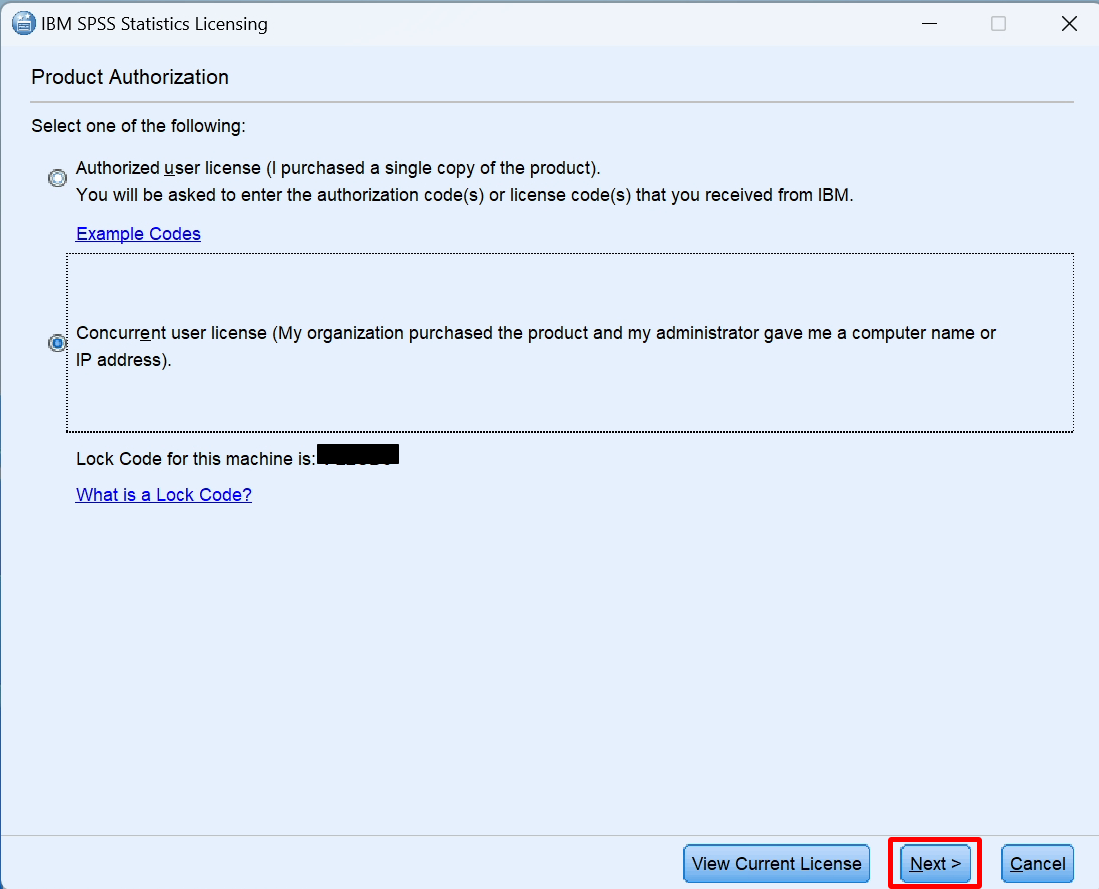
- You need to activate the product by obtaining a license. Launch the "License Authorization Wizard" from the following location:
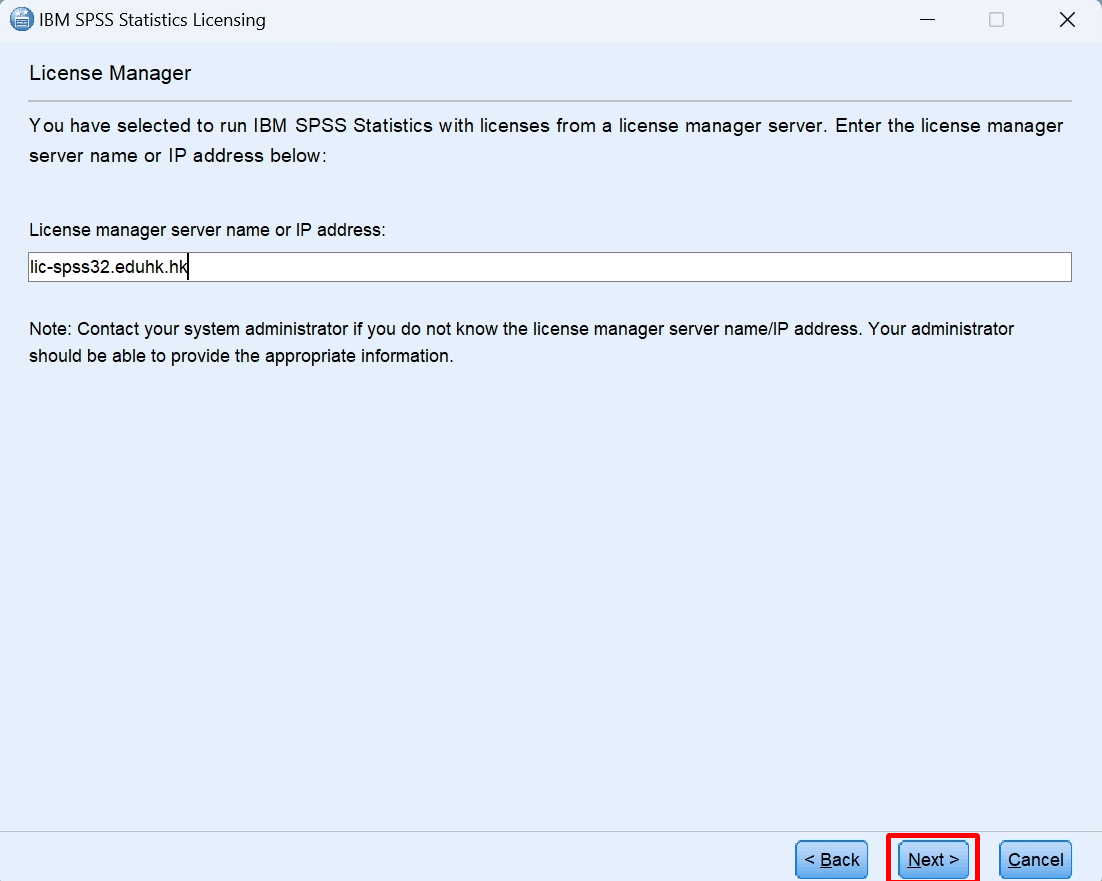
Software application Path to the License Authorization Wizard SPSS Start -> IBM SPSS Statistic -> IBM SPSS Statistic 32 License Authorization Wizard Amos Start -> IBM SPSS Amos -> IBM SPSS Amos 32 License Authorization Wizard - Choose "Concurrent user license" for the Product Authorization. And enter "lic-spss{version_number}.eduhk.hk" as the License Manager server name.
SPSS/Amos version License server name Version 32 lic-spss32.eduhk.hk - It may take up to 30 minutes to finish the installation.
Launch SPSS/Amos
- Connect to the EdUHK SSL VPN if you have not yet done so.
- Launch SPSS/Amos.
- You will get a "Windows Security Alert" the first time you launch it. Tick the option "Private networks, such as my home or work network" and click the "Allow access" button.
- For the "Unicode Mode", choose "Use Unicode encoding". (It is recommended that users should choose "Use Unicode encoding" regardless of whether they use Chinese characters or not in SPSS.)
- Now you can open your SPSS data file.
2. SPSS/Amos on "VDI" platform
The "VDI" platform provides quick access to SPSS/Amos without the need to actually install the software. To use SPSS/Amos on the VDI platform, please visit Virtual Desktop Infrastructure (VDI) - For Staff service website for details.
